
Your AI Agent Pipeline Has No Zombie Detection — Here's How to Add It

I ran an autonomous task system for three months before I realized it had a blind spot the size of a barn door. Processes were “healthy.” CPU was fine. Memory was fine. And yet, nothing was getting done.

One subagent silently died. The parent waited three hours for a response that was never coming. When I finally dug in, I found a queue full of stalled tasks — all of them showing green on the dashboard. None of them had produced useful output in hours.

This is the zombie task problem. Your agent pipeline monitors whether the process is running. It never checks whether the process is actually working.

Traditional monitoring catches uptime. It doesn’t catch behavior. AI agents fail subtly — plausible wrong answers, skipped steps, loops that burn tokens without making progress, context errors that compound silently. No error codes. No crash logs. Just a process that looks alive and a task that’s been dead for hours.

Here’s how to fix that.
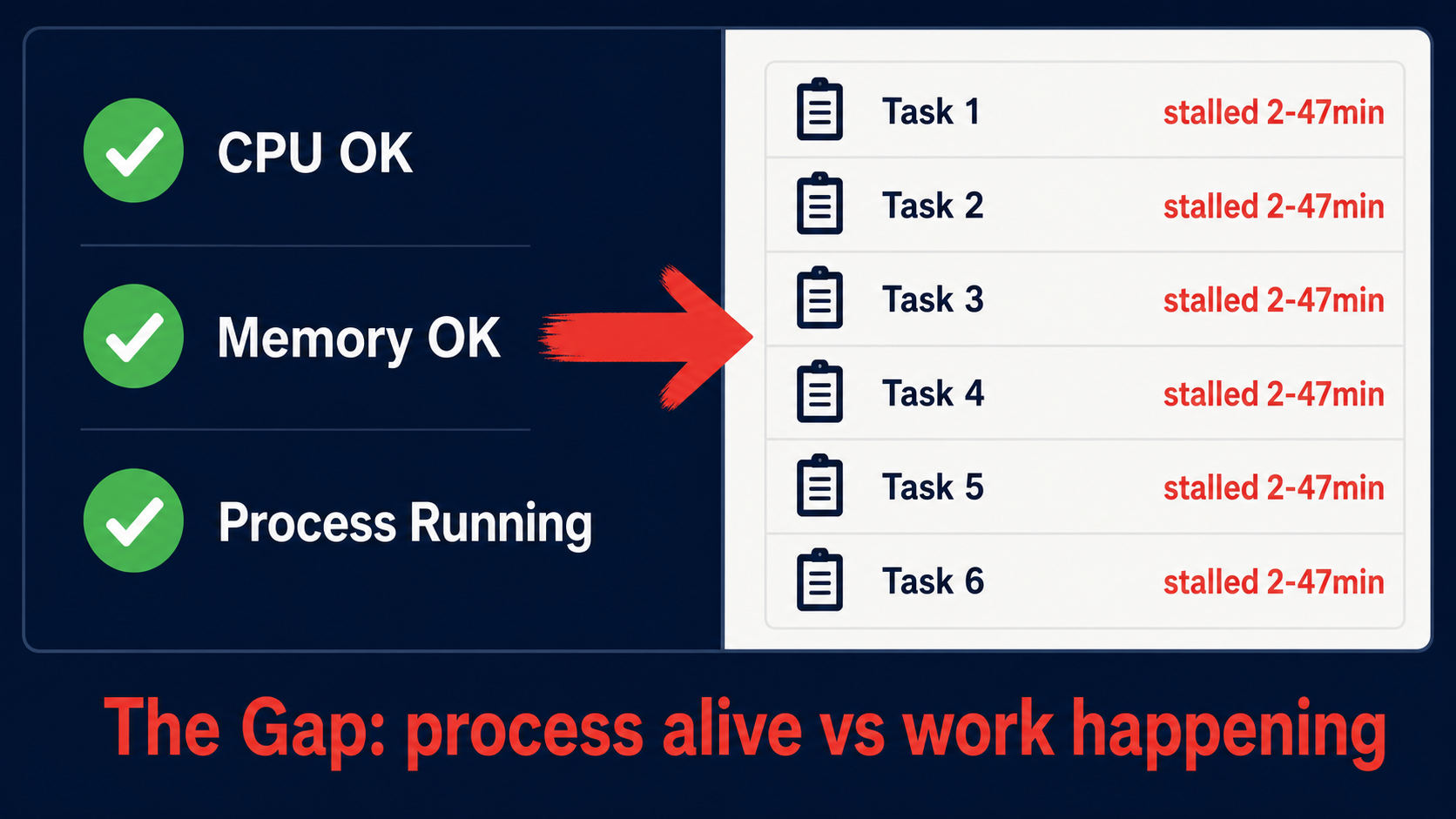
The monitoring gap: green status indicators alongside stalled tasks that show no progress

The Four Zombie Patterns That Will Eat Your Pipeline

After building detection into our system and auditing three months of logs, four patterns accounted for nearly every silent failure we saw.

1. Infinite Wait. A tool call hangs. No timeout fires. The agent sits there waiting for a response that will never arrive. The process is running. The thread is active. Nothing is happening.

2. Compaction Loop. Context compaction runs, and the agent loses critical state. It starts repeating itself — not obviously, but in a slow drift where each cycle produces slightly less useful output than the last. MindStudio documented this as one of six reasoning-layer failure modes, alongside context degradation, specification drift, and sycophantic confirmation.

3. Subagent Black Hole. A child agent dies. The parent waits forever. This was the one that bit me hardest — a subagent crashed on a memory allocation error, and the parent sat there for three hours with no timeout and no fallback.

4. Rate Limit Sleep. The agent hits a rate limit, backs off, and never wakes up. The retry logic has a bug, or the backoff grows beyond the task’s lifetime, or the wake-up condition never triggers.

These patterns are not theoretical. They show up in every production agent system that runs long enough without behavioral monitoring.

Takeaway: If your monitoring only checks “is the process running,” you’re not monitoring. You’re guessing.

Wall-Clock Timeouts: The Hard Floor

The first and most important fix is simple: every task gets a maximum duration. Not a suggestion. A hard wall-clock timeout that kills the task and triggers recovery.

 1
 2
 3
 4
 5
 6
 7
 8
 9
10
11
12
13
14
15
16
# task-config.yaml
tasks:
  code_review:
    max_duration: 600  # seconds
    heartbeat_interval: 120
    on_timeout: "escalate_to_parent"

  data_pipeline:
    max_duration: 1800
    heartbeat_interval: 300
    on_timeout: "retry_with_fresh_context"

  long_running_analysis:
    max_duration: 3600
    heartbeat_interval: 600
    on_timeout: "checkpoint_and_resume"

The key insight: timeouts are not about punishing slow tasks. They’re about bounding the cost of failure. Braintrust traced one production loop that cost 274 LLM calls, 91,547 tokens, and $1.38 before anyone noticed. A wall-clock timeout would have caught it in minutes.

Set your timeouts based on observed p95 completion times, plus a margin. If a task normally takes 5 minutes, give it 15. If it normally takes 30 minutes, give it 60. The goal is to catch the zombie, not to rush the living.

 1
 2
 3
 4
 5
 6
 7
 8
 9
10
11
12
13
14
15
16
17
import time
from concurrent.futures import ThreadPoolExecutor, TimeoutError

def run_with_wall_clock(task_fn, task_name: str, max_seconds: int):
    start = time.monotonic()
    with ThreadPoolExecutor(max_workers=1) as executor:
        future = executor.submit(task_fn)
        try:
            result = future.result(timeout=max_seconds)
            elapsed = time.monotonic() - start
            print(f"[{task_name}] Completed in {elapsed:.1f}s")
            return result
        except TimeoutError:
            elapsed = time.monotonic() - start
            print(f"[{task_name}] ZOMBIE DETECTED after {elapsed:.1f}s (limit: {max_seconds}s)")
            future.cancel()
            trigger_recovery(task_name)

Takeaway: No task should run without a hard time limit. Set it at 2-3x the normal completion time. Enforce it at the process level, not the honor system.

Checkpoint Heartbeats: Proving Progress, Not Just Presence

A timeout tells you when a task has been running too long. But you can do better. You can check whether the task is making progress.

The pattern is checkpoint heartbeats. Every N minutes, the task must write proof that it’s doing useful work. No checkpoint within the window means the task is stalled.

 1
 2
 3
 4
 5
 6
 7
 8
 9
10
11
12
13
14
15
16
17
18
19
20
21
22
23
24
25
26
27
28
29
30
31
32
import json
import time
from pathlib import Path

class CheckpointMonitor:
    def __init__(self, checkpoint_dir: str, stall_threshold_seconds: int = 600):
        self.checkpoint_dir = Path(checkpoint_dir)
        self.checkpoint_dir.mkdir(parents=True, exist_ok=True)
        self.stall_threshold = stall_threshold_seconds

    def write_checkpoint(self, task_id: str, data: dict):
        checkpoint = {
            "task_id": task_id,
            "timestamp": time.time(),
            "data": data
        }
        path = self.checkpoint_dir / f"{task_id}.json"
        path.write_text(json.dumps(checkpoint))

    def is_stalled(self, task_id: str) -> bool:
        path = self.checkpoint_dir / f"{task_id}.json"
        if not path.exists():
            return True  # No checkpoint ever written = stalled
        checkpoint = json.loads(path.read_text())
        elapsed = time.time() - checkpoint["timestamp"]
        return elapsed > self.stall_threshold

    def get_last_progress(self, task_id: str) -> dict | None:
        path = self.checkpoint_dir / f"{task_id}.json"
        if not path.exists():
            return None
        return json.loads(path.read_text())

The checkpoint proves progress — files written, records processed, state advanced. A timestamp alone is not enough. Watch the time between checkpoints. If it exceeds your threshold, the task is stalled regardless of what the process metrics say.

Takeaway: A heartbeat that only proves the process is alive is worthless. Your checkpoints must prove progress. Timestamp alone is not enough.
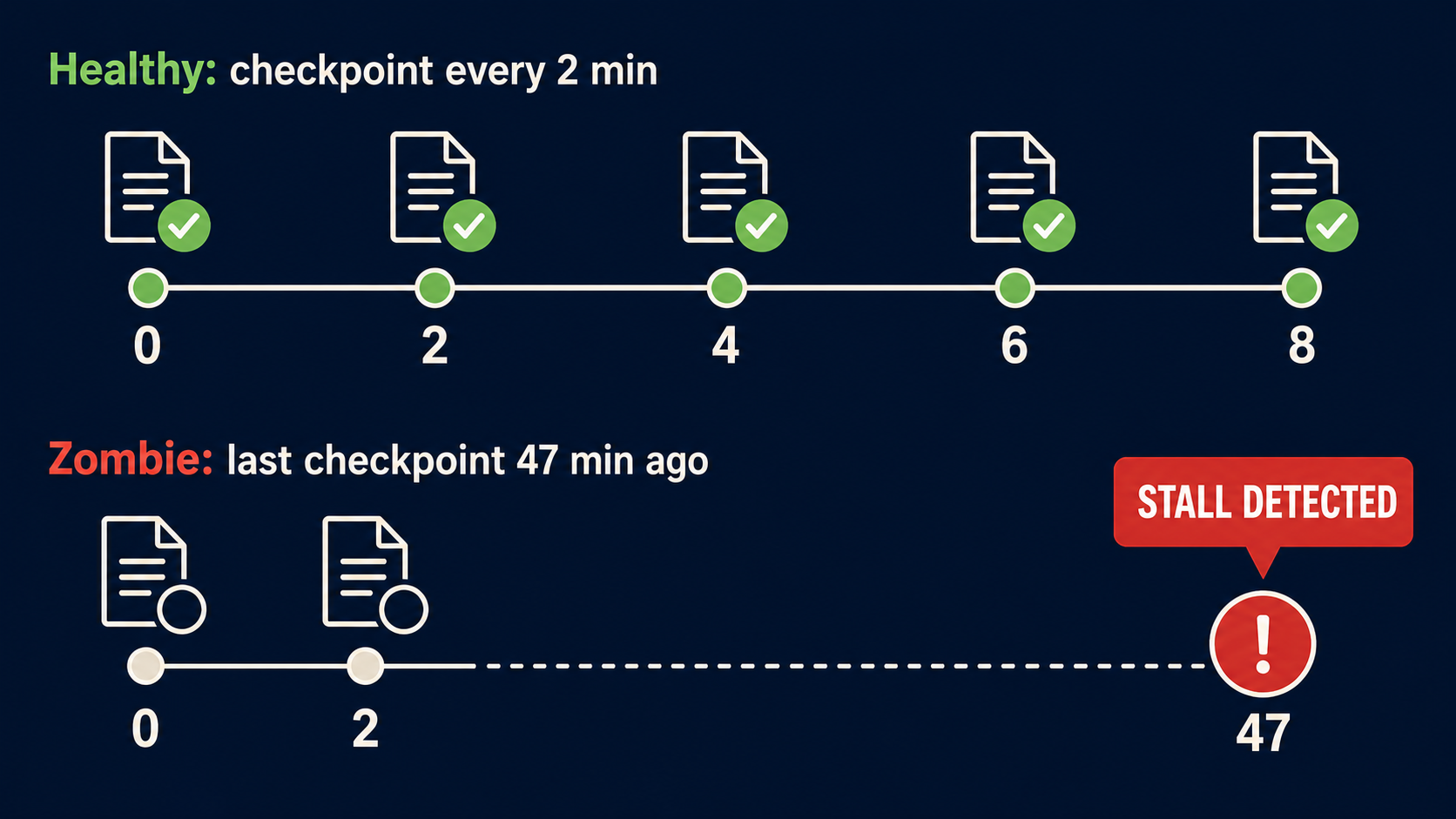
Timeline showing healthy task with regular checkpoints alongside zombie task stalled for 47 minutes

Output Verification: Trust, but Validate

The final layer is output verification. When a task claims it’s done, check the output before you trust it.

This sounds obvious. Most systems don’t do it.

 1
 2
 3
 4
 5
 6
 7
 8
 9
10
11
12
13
14
15
16
17
18
19
20
21
22
23
24
25
26
27
28
29
30
31
32
33
34
35
36
37
38
39
40
41
42
43
44
45
import json
import time
from pathlib import Path

class OutputVerifier:
    def __init__(self, expectations: dict):
        """
        expectations: {
            "output_path": "/data/results/analysis.json",
            "min_size_bytes": 100,
            "required_fields": ["summary", "confidence", "recommendations"],
            "max_age_seconds": 300
        }
        """
        self.expectations = expectations

    def verify(self) -> tuple[bool, list[str]]:
        errors = []
        path = Path(self.expectations["output_path"])

        if not path.exists():
            errors.append(f"Output file missing: {path}")
            return False, errors

        if path.stat().st_size < self.expectations.get("min_size_bytes", 1):
            errors.append(f"Output file too small: {path.stat().st_size} bytes")

        age = time.time() - path.stat().st_mtime
        max_age = self.expectations.get("max_age_seconds", float('inf'))
        if age > max_age:
            errors.append(f"Output file stale: {age:.0f}s old (max: {max_age}s)")

        required_fields = self.expectations.get("required_fields", [])
        if required_fields and path.suffix == ".json":
            try:
                data = json.loads(path.read_text())
                for field in required_fields:
                    if field not in data:
                        errors.append(f"Missing required field: {field}")
                    elif data[field] is None or data[field] == "":
                        errors.append(f"Empty required field: {field}")
            except json.JSONDecodeError:
                errors.append("Output file is not valid JSON")

        return len(errors) == 0, errors

Latitude’s research makes the point clearly: silent failures are invisible. Goal drift, context loss, quality degradation — none of these produce error codes. You need decision-path tracing, not just endpoint monitoring. Output verification is the simplest form of that. Did the task produce what it was supposed to produce? Is the output structurally valid? Is it recent?

UptimeRobot’s research on AI agent failures reinforces this. Agents fail subtly. They produce plausible wrong answers. They skip steps. They loop. Traditional monitoring catches uptime, not behavior. You need to verify the actual artifacts.

Takeaway: Never trust a task’s self-reported completion. Verify the output exists, is non-empty, is recent, and contains the expected structure. This catches more failure modes than any other single check.

Putting It All Together: A Detection Pipeline

Here’s a minimal orchestrator that combines all three layers:

 1
 2
 3
 4
 5
 6
 7
 8
 9
10
11
12
13
14
15
16
17
18
19
20
21
22
23
24
25
26
27
28
29
30
31
32
33
34
35
36
37
38
39
40
41
42
43
44
45
46
47
48
49
50
51
52
53
54
55
56
57
58
59
60
61
62
63
64
65
66
67
68
69
70
71
72
73
import time
import logging
from dataclasses import dataclass, field
from concurrent.futures import ThreadPoolExecutor, TimeoutError as FuturesTimeout

logger = logging.getLogger("zombie-detector")

@dataclass
class TaskConfig:
    name: str
    max_duration_seconds: int = 600
    stall_threshold_seconds: int = 600
    max_retries: int = 2
    output_expectations: dict = field(default_factory=dict)

class ZombieAwareOrchestrator:
    def __init__(self, config: TaskConfig):
        self.config = config
        self.checkpoint_monitor = CheckpointMonitor(
            checkpoint_dir=f"/tmp/checkpoints/{config.name}",
            stall_threshold_seconds=config.stall_threshold_seconds
        )

    def execute(self, task_fn, *args, **kwargs):
        for attempt in range(self.config.max_retries + 1):
            logger.info(f"[{self.config.name}] Attempt {attempt + 1}")
            state = self._run_once(task_fn, args, kwargs)

            if state == "COMPLETED":
                return True

            if "ZOMBIE" in state:
                logger.warning(f"[{self.config.name}] {state}, recovering...")
                self._recover()
                continue

            if state == "FAILED":
                logger.error(f"[{self.config.name}] Hard failure, not retryable")
                return False

        logger.error(f"[{self.config.name}] Exhausted all retries")
        return False

    def _run_once(self, task_fn, args, kwargs) -> str:
        # Wall-clock timeout: enforce hard limit
        with ThreadPoolExecutor(max_workers=1) as executor:
            future = executor.submit(task_fn, *args, **kwargs)
            try:
                result = future.result(timeout=self.config.max_duration_seconds)
            except FuturesTimeout:
                return "ZOMBIE_TIMEOUT"
            except Exception as e:
                logger.error(f"[{self.config.name}] Exception: {e}")
                return "FAILED"

        # Heartbeat stall detection
        if self.checkpoint_monitor.is_stalled(self.config.name):
            return "ZOMBIE_STALL"

        # Output verification
        if self.config.output_expectations:
            verifier = OutputVerifier(self.config.output_expectations)
            valid, errors = verifier.verify()
            if not valid:
                for err in errors:
                    logger.error(f"[{self.config.name}] {err}")
                return "ZOMBIE_INVALID_OUTPUT"

        return "COMPLETED"

    def _recover(self):
        logger.info(f"[{self.config.name}] Recovery: clearing checkpoints, releasing locks")
        # Clear checkpoint files, release resources, reset rate limit state

The entire detection layer — timeouts, heartbeats, output verification — fits in under 150 lines. But it closes the gap that most agent pipelines leave wide open.
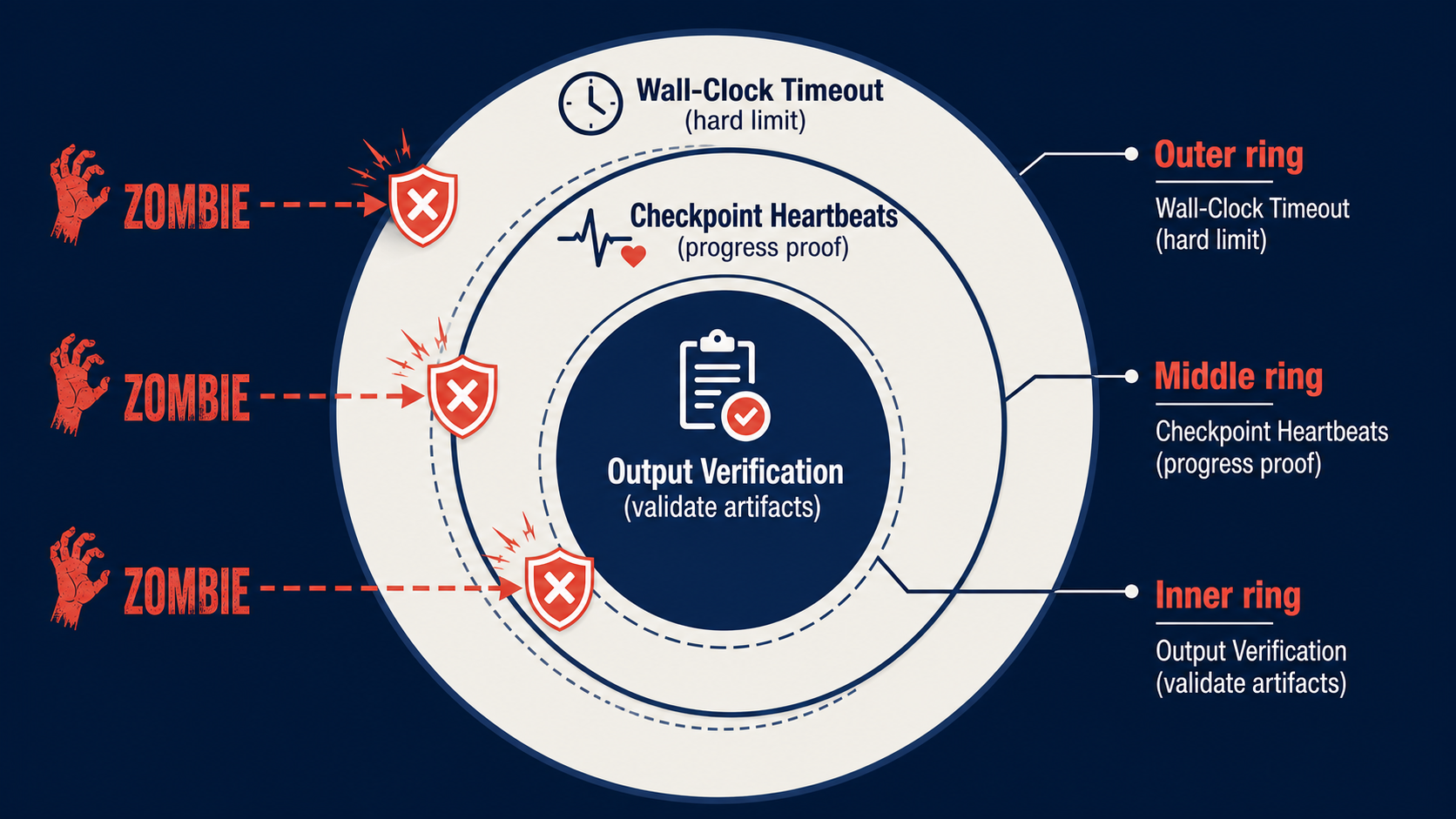
Three-layer defense diagram: Wall-Clock Timeout, Checkpoint Heartbeats, Output Verification blocking zombie tasks

What This Costs and What It Saves

Let’s talk numbers.

Before detection: silent failures going unnoticed for hours. Tasks stuck in queues, blocking downstream work. One production loop incident costing 274 LLM calls, 91,547 tokens, and $1.38 — and that was just the one that got noticed.

After detection: silent failures caught within minutes, not hours. Stalled tasks restarted automatically. No more ghost tasks clogging the queue.

The implementation cost is under 150 lines of infrastructure code and a checkpoint directory. The savings are measured in wasted compute, missed SLAs, and the engineering hours spent debugging “mystery” failures that were only mysterious because nobody was looking at the right signals.

MindStudio identified six reasoning-layer failure modes. At least four of them — context degradation, specification drift, tool call failures, and silent failure — produce zombies that traditional monitoring won’t catch. You need behavioral monitoring. Process health is a necessary signal. It is not sufficient.

Takeaway: The detection layer is cheap. The failures it prevents are expensive. Implement wall-clock timeouts first (biggest impact, lowest effort), then checkpoint heartbeats, then output verification. Each layer catches what the previous one misses.

Start Here

If you do one thing after reading this, do this:

  1. Audit your pipeline for missing timeouts. Find every task that has no wall-clock limit. Add one. Set it generous — 3x the normal completion time. Log every timeout. You’ll see more than you expect in the first week.

  2. Add checkpoint heartbeats for long-running tasks. Any task over 5 minutes needs a heartbeat. Make the checkpoint prove progress — files written, records processed, state advanced.

  3. Add output verification for every task that produces artifacts. Files, database writes, API responses — check existence, size, freshness, and structure before marking complete.

Three layers. Under 150 lines of code. Your agents are already failing silently. The only question is whether you’re detecting it.